> ## Documentation Index
> Fetch the complete documentation index at: https://docs-staging-feat-universal-portals.mintlify.site/llms.txt
> Use this file to discover all available pages before exploring further.
> Learn how to configure Auth0 as an identity provider using the SAML2 Web App addon for Egencia.
# Configure Egencia as SAML Service Provider
Use the following SAML configuration for Egencia.
1. Go to [Dashboard > Applications > Applications](https://manage.auth0.com/#/applications) and either create a new application or click the name of an application to update.
2. Go to the **Addons** tab and enable the **SAML2 Web App** toggle.
3. On the **Settings** tab, set the **Application Callback URL** to: `https://www.egencia.com/auth/v1/artifactConsumer`.
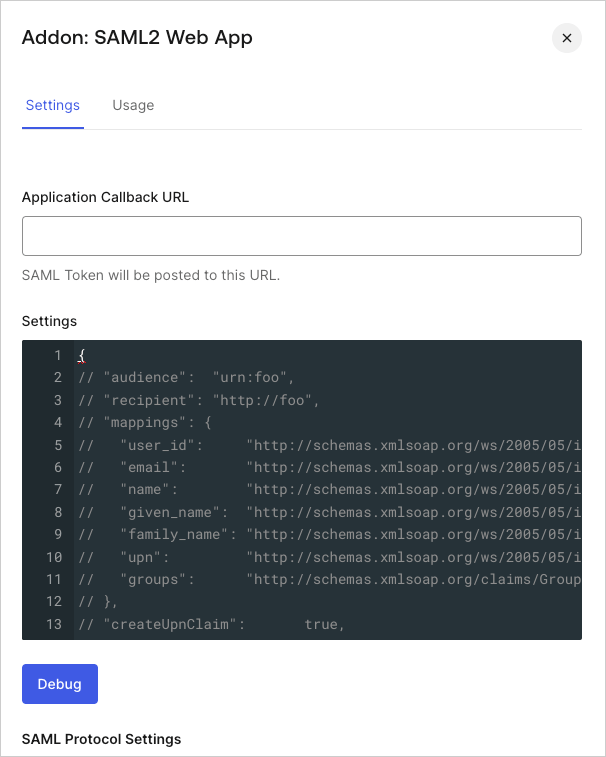 4. Paste the following code into the **Settings** text box and click **Debug**.
```json lines theme={null}
{
"audience": "https://{yourAccountName}.egencia.com",
"mappings": {
},
"createUpnClaim": false,
"passthroughClaimsWithNoMapping": false,
"mapUnknownClaimsAsIs": false,
"mapIdentities": false,
"nameIdentifierFormat": "urn:oasis:names:tc:SAML:1.1:nameid-format:emailAddress",
"nameIdentifierProbes": [
"http://schemas.xmlsoap.org/ws/2005/05/identity/claims/emailaddress",
],
}
```
5. Scroll to the bottom of the tab and click **Enable**.
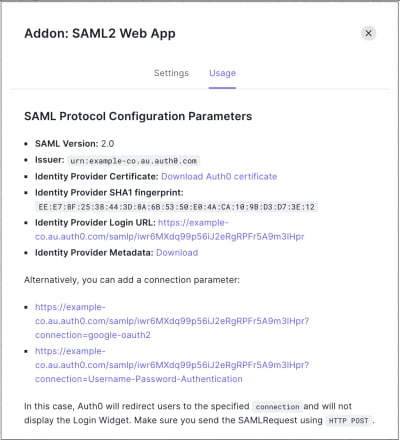
6. On the **Usage** tab, locate **Identity Provider Metadata**, and click **Download** to download the metadata file. You'll need this when you configure Auth0 as the identity provider (IdP).
4. Paste the following code into the **Settings** text box and click **Debug**.
```json lines theme={null}
{
"audience": "https://{yourAccountName}.egencia.com",
"mappings": {
},
"createUpnClaim": false,
"passthroughClaimsWithNoMapping": false,
"mapUnknownClaimsAsIs": false,
"mapIdentities": false,
"nameIdentifierFormat": "urn:oasis:names:tc:SAML:1.1:nameid-format:emailAddress",
"nameIdentifierProbes": [
"http://schemas.xmlsoap.org/ws/2005/05/identity/claims/emailaddress",
],
}
```
5. Scroll to the bottom of the tab and click **Enable**.
6. On the **Usage** tab, locate **Identity Provider Metadata**, and click **Download** to download the metadata file. You'll need this when you configure Auth0 as the identity provider (IdP).