> ## Documentation Index
> Fetch the complete documentation index at: https://docs-staging-feat-universal-portals.mintlify.site/llms.txt
> Use this file to discover all available pages before exploring further.
> Forms is a visual editor that allows you to create customizable forms that can be used to extend your identity flows with additional steps and business logic.
# Forms
Forms is a visual editor that allows you to create customizable forms that can extend your identity flows with additional steps and business logic.
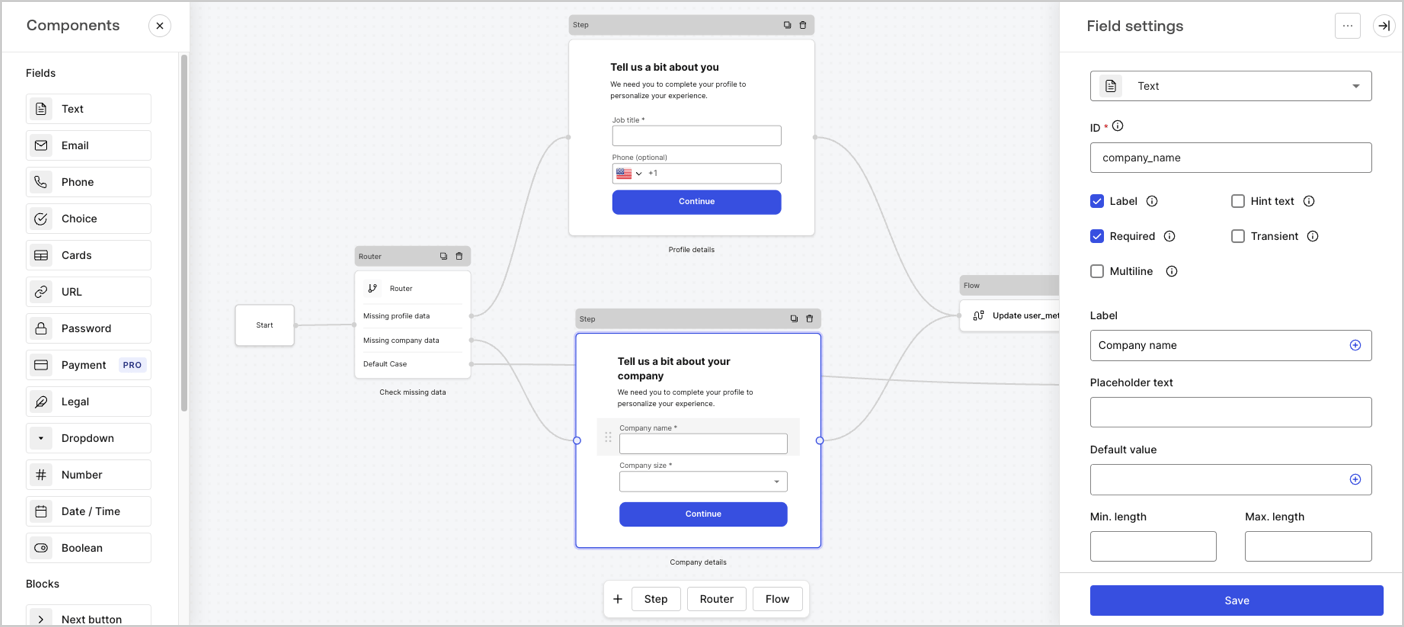 Some of the key capabilities of Forms include:
* A controlled and secure experience within your tenant's domain. No need to [Redirect](/docs/customize/actions/explore-triggers/signup-and-login-triggers/login-trigger/redirect-with-actions) users to external sites.
* Pre-built components with frontend and backend validations.
* Custom business logic with out-of-the-box integrations with third parties.
* Consistent branding experience with Universal Login.
Using Forms enables you to build use cases like:
* **Progressive profiling:** Define a set of conditions to require users to complete additional information as they engage with your product. For example, when users login for a third-time, you can require them to complete their profile.
* **Custom policies acceptance:** If you need to update your policies, you can define logic to check if users have accepted the latest policies, and depending on that, display a custom form to users requiring acceptance.
* **Custom signup or login steps:** Extend and customize your flows with additional steps and custom logic. For example, you can verify email or phone numbers with OTP and account linking, or verify payment details with Stripe, and more.
| Read... | To learn... |
| -------------------------------------------------------------------------------------------- | --------------------------------------------------------------------------- |
| [Nodes and components](/docs/customize/forms/nodes-and-components) | About Forms and its components. |
| [Flows](/docs/customize/forms/flows) | About Flows and its components. |
| [Variables](/docs/customize/forms/variables) | About the different types of variables in Forms and Flows. |
| [Routers: Add conditional logic to Forms](/docs/customize/forms/routers) | How to implement conditional logic routing in Forms. |
| [Custom Field Component for Forms](/docs/customize/forms/custom-field-components) | How to create custom fields in Forms. |
| [Render forms using Actions](/docs/customize/forms/render) | How to render forms using Actions. |
| [Using the Vault](/docs/customize/forms/vault) | How to securely store API credentials in Forms. |
| [Custom Messages and Translation](/docs/customize/forms/custom-messages-and-translation) | How to create custom messages and translations in Forms. |
| [Resources: Templates](https://developer.auth0.com/resources/templates/forms) | About the Auth0 form templates. |
| [Use Cases: Progressive profiling](/docs/customize/forms/configure-progressive-profile-form) | How to implement a progressive profiling form. For use with a Login Action. |
| [Use Cases: Custom policies](/docs/customize/forms/configure-update-policy-form) | How to implement a custom policy form. For use with a Login Action. |
| [Use Cases: Custom signup steps](/docs/customize/forms/configure-additional-signup-steps) | How to implement custom signup steps. For use with a Login Action. |
Some of the key capabilities of Forms include:
* A controlled and secure experience within your tenant's domain. No need to [Redirect](/docs/customize/actions/explore-triggers/signup-and-login-triggers/login-trigger/redirect-with-actions) users to external sites.
* Pre-built components with frontend and backend validations.
* Custom business logic with out-of-the-box integrations with third parties.
* Consistent branding experience with Universal Login.
Using Forms enables you to build use cases like:
* **Progressive profiling:** Define a set of conditions to require users to complete additional information as they engage with your product. For example, when users login for a third-time, you can require them to complete their profile.
* **Custom policies acceptance:** If you need to update your policies, you can define logic to check if users have accepted the latest policies, and depending on that, display a custom form to users requiring acceptance.
* **Custom signup or login steps:** Extend and customize your flows with additional steps and custom logic. For example, you can verify email or phone numbers with OTP and account linking, or verify payment details with Stripe, and more.
| Read... | To learn... |
| -------------------------------------------------------------------------------------------- | --------------------------------------------------------------------------- |
| [Nodes and components](/docs/customize/forms/nodes-and-components) | About Forms and its components. |
| [Flows](/docs/customize/forms/flows) | About Flows and its components. |
| [Variables](/docs/customize/forms/variables) | About the different types of variables in Forms and Flows. |
| [Routers: Add conditional logic to Forms](/docs/customize/forms/routers) | How to implement conditional logic routing in Forms. |
| [Custom Field Component for Forms](/docs/customize/forms/custom-field-components) | How to create custom fields in Forms. |
| [Render forms using Actions](/docs/customize/forms/render) | How to render forms using Actions. |
| [Using the Vault](/docs/customize/forms/vault) | How to securely store API credentials in Forms. |
| [Custom Messages and Translation](/docs/customize/forms/custom-messages-and-translation) | How to create custom messages and translations in Forms. |
| [Resources: Templates](https://developer.auth0.com/resources/templates/forms) | About the Auth0 form templates. |
| [Use Cases: Progressive profiling](/docs/customize/forms/configure-progressive-profile-form) | How to implement a progressive profiling form. For use with a Login Action. |
| [Use Cases: Custom policies](/docs/customize/forms/configure-update-policy-form) | How to implement a custom policy form. For use with a Login Action. |
| [Use Cases: Custom signup steps](/docs/customize/forms/configure-additional-signup-steps) | How to implement custom signup steps. For use with a Login Action. |