> ## Documentation Index
> Fetch the complete documentation index at: https://docs-staging-feat-universal-portals.mintlify.site/llms.txt
> Use this file to discover all available pages before exploring further.

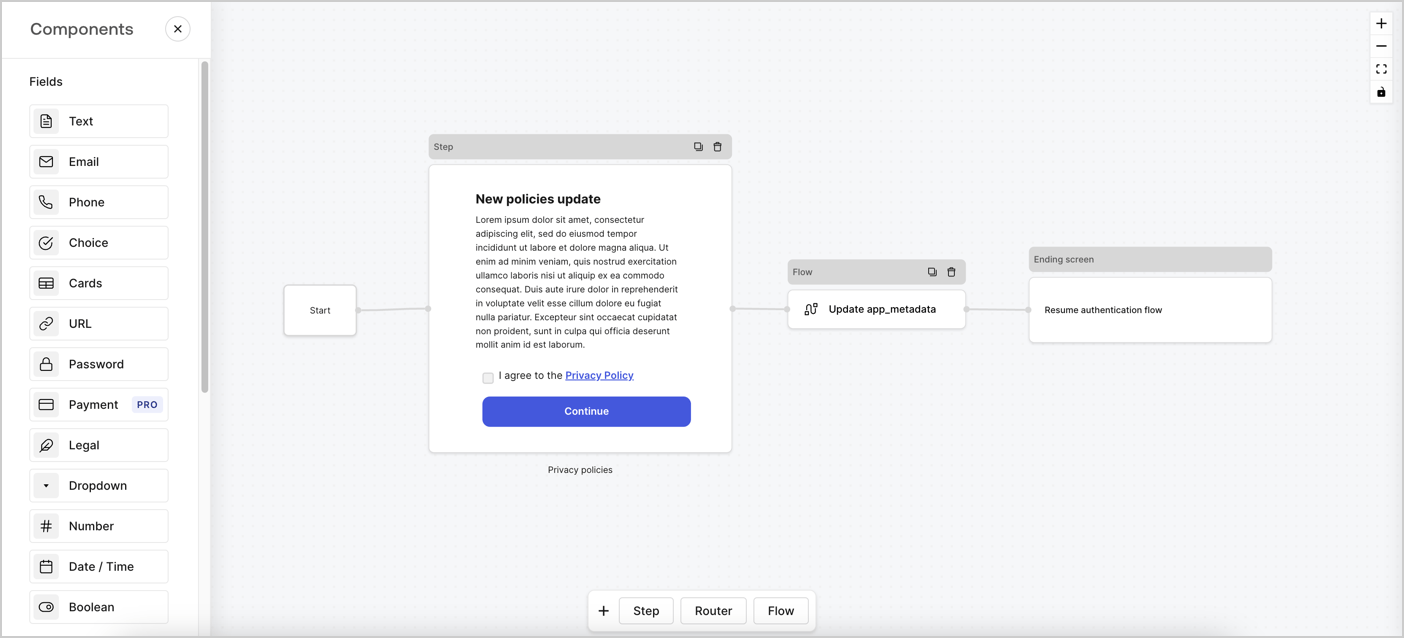
> Learn how to configure an update policy form using Forms for Actions for users to review and accept new terms of service or consent updates.

# Use Cases: Configure an update policy form using Forms

<Card title="Before you start">
  1. Create a [Machine-to-Machine Application](/docs/get-started/auth0-overview/create-applications/machine-to-machine-apps) with the following scopes enabled:

  * `read:users`
  * `update:users`
  * `create:users`
  * `read:users_app_metadata`
  * `update:users_app_metadata`
  * `create:users_app_metadata`

  2. Add a [Vault connection](/docs/customize/forms/vault) using the M2M application credentials.
</Card>

Forms for Actions allows you to create custom privacy policies flows and store the consent under the `app_metadata` object.
<Frame>
  <img src="https://mintcdn.com/docs-staging-feat-universal-portals/CK2KNQ8eWcFZT4zq/docs/images/cdy7uua7fh8z/6i68dMvHDTijfRmSgN1x8Q/ad900e7d4c0fb34645921435472b8684/privavy-policy-form.png?fit=max&auto=format&n=CK2KNQ8eWcFZT4zq&q=85&s=128f10e15ec086fdaf1d9cda661d72f9" alt="Dashboard > Actions > Forms > Privacy policy use case" data-og-width="1404" width="1404" data-og-height="638" height="638" data-path="docs/images/cdy7uua7fh8z/6i68dMvHDTijfRmSgN1x8Q/ad900e7d4c0fb34645921435472b8684/privavy-policy-form.png" data-optimize="true" data-opv="3" srcset="https://mintcdn.com/docs-staging-feat-universal-portals/CK2KNQ8eWcFZT4zq/docs/images/cdy7uua7fh8z/6i68dMvHDTijfRmSgN1x8Q/ad900e7d4c0fb34645921435472b8684/privavy-policy-form.png?w=280&fit=max&auto=format&n=CK2KNQ8eWcFZT4zq&q=85&s=ad15c81e0b14ed2a3a0bf5307b9a27d1 280w, https://mintcdn.com/docs-staging-feat-universal-portals/CK2KNQ8eWcFZT4zq/docs/images/cdy7uua7fh8z/6i68dMvHDTijfRmSgN1x8Q/ad900e7d4c0fb34645921435472b8684/privavy-policy-form.png?w=560&fit=max&auto=format&n=CK2KNQ8eWcFZT4zq&q=85&s=e9a366fae58c42eb7cac050f18526e09 560w, https://mintcdn.com/docs-staging-feat-universal-portals/CK2KNQ8eWcFZT4zq/docs/images/cdy7uua7fh8z/6i68dMvHDTijfRmSgN1x8Q/ad900e7d4c0fb34645921435472b8684/privavy-policy-form.png?w=840&fit=max&auto=format&n=CK2KNQ8eWcFZT4zq&q=85&s=f491b1e68b43bcb2a9368fd4fb9eb500 840w, https://mintcdn.com/docs-staging-feat-universal-portals/CK2KNQ8eWcFZT4zq/docs/images/cdy7uua7fh8z/6i68dMvHDTijfRmSgN1x8Q/ad900e7d4c0fb34645921435472b8684/privavy-policy-form.png?w=1100&fit=max&auto=format&n=CK2KNQ8eWcFZT4zq&q=85&s=b7ba0aab75dd638f882986c1611314ef 1100w, https://mintcdn.com/docs-staging-feat-universal-portals/CK2KNQ8eWcFZT4zq/docs/images/cdy7uua7fh8z/6i68dMvHDTijfRmSgN1x8Q/ad900e7d4c0fb34645921435472b8684/privavy-policy-form.png?w=1650&fit=max&auto=format&n=CK2KNQ8eWcFZT4zq&q=85&s=e41a62402c98fc03a3084e2706221e44 1650w, https://mintcdn.com/docs-staging-feat-universal-portals/CK2KNQ8eWcFZT4zq/docs/images/cdy7uua7fh8z/6i68dMvHDTijfRmSgN1x8Q/ad900e7d4c0fb34645921435472b8684/privavy-policy-form.png?w=2500&fit=max&auto=format&n=CK2KNQ8eWcFZT4zq&q=85&s=74fd8298d87e25747cc29ff209839780 2500w" />
</Frame>

The sections below outline how you can create an Update Policy form using nodes and flows, along with steps for adding your form to a [Post Login](/docs/customize/actions/explore-triggers/signup-and-login-triggers/login-trigger) Action.

## Create a form from scratch

Follow these steps to create a form to gather information:

1. Open the Form editor by selecting **Auth0 Dashboard > Actions > Forms.**
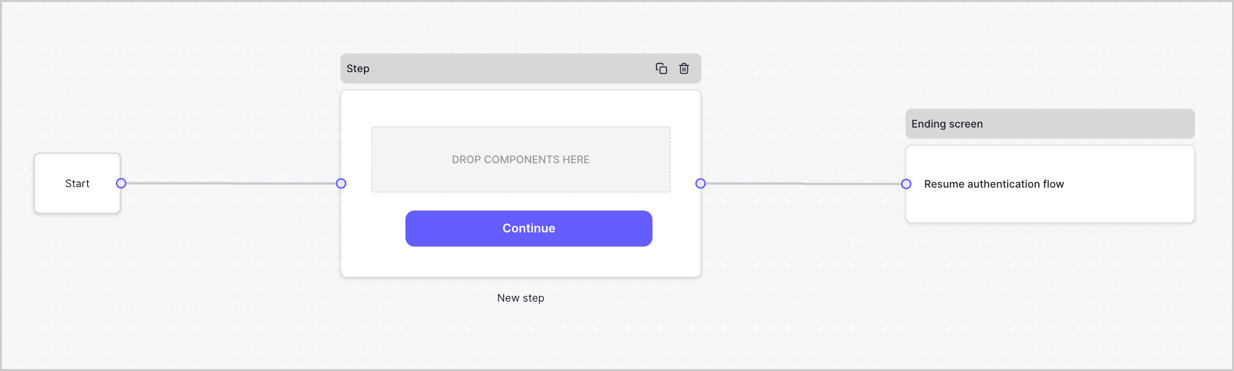
2. Select **Create Form** > **Start from scratch**.

By default, a new form contains a Start node, a Step node, and an Ending screen node.
<Frame>
  <img src="https://mintcdn.com/docs-staging-feat-universal-portals/o-xATz1XN__CKV80/docs/images/cdy7uua7fh8z/2TZ9jSjgEcARFpULI6hz4R/a4319a1bd482f2ee5cc23100fdb2f42c/New-form-Forms-for-action-use-case.png?fit=max&auto=format&n=o-xATz1XN__CKV80&q=85&s=1b71beea4d7e3d8804e33979c48fa309" alt="Dashboard > Forms > Use Cases > Form" data-og-width="1234" width="1234" data-og-height="371" height="371" data-path="docs/images/cdy7uua7fh8z/2TZ9jSjgEcARFpULI6hz4R/a4319a1bd482f2ee5cc23100fdb2f42c/New-form-Forms-for-action-use-case.png" data-optimize="true" data-opv="3" srcset="https://mintcdn.com/docs-staging-feat-universal-portals/o-xATz1XN__CKV80/docs/images/cdy7uua7fh8z/2TZ9jSjgEcARFpULI6hz4R/a4319a1bd482f2ee5cc23100fdb2f42c/New-form-Forms-for-action-use-case.png?w=280&fit=max&auto=format&n=o-xATz1XN__CKV80&q=85&s=5d67f6f69d4d9d89c9bee1d84c2ed4c4 280w, https://mintcdn.com/docs-staging-feat-universal-portals/o-xATz1XN__CKV80/docs/images/cdy7uua7fh8z/2TZ9jSjgEcARFpULI6hz4R/a4319a1bd482f2ee5cc23100fdb2f42c/New-form-Forms-for-action-use-case.png?w=560&fit=max&auto=format&n=o-xATz1XN__CKV80&q=85&s=1cfd99d3ce2c902fc7572538f19b1c19 560w, https://mintcdn.com/docs-staging-feat-universal-portals/o-xATz1XN__CKV80/docs/images/cdy7uua7fh8z/2TZ9jSjgEcARFpULI6hz4R/a4319a1bd482f2ee5cc23100fdb2f42c/New-form-Forms-for-action-use-case.png?w=840&fit=max&auto=format&n=o-xATz1XN__CKV80&q=85&s=8fcac5448f4cd1cbd9b76a5a73b46867 840w, https://mintcdn.com/docs-staging-feat-universal-portals/o-xATz1XN__CKV80/docs/images/cdy7uua7fh8z/2TZ9jSjgEcARFpULI6hz4R/a4319a1bd482f2ee5cc23100fdb2f42c/New-form-Forms-for-action-use-case.png?w=1100&fit=max&auto=format&n=o-xATz1XN__CKV80&q=85&s=89991c8c87d4e36d92f72515addfb948 1100w, https://mintcdn.com/docs-staging-feat-universal-portals/o-xATz1XN__CKV80/docs/images/cdy7uua7fh8z/2TZ9jSjgEcARFpULI6hz4R/a4319a1bd482f2ee5cc23100fdb2f42c/New-form-Forms-for-action-use-case.png?w=1650&fit=max&auto=format&n=o-xATz1XN__CKV80&q=85&s=928652d048c02ca18dfd0768cfb37a42 1650w, https://mintcdn.com/docs-staging-feat-universal-portals/o-xATz1XN__CKV80/docs/images/cdy7uua7fh8z/2TZ9jSjgEcARFpULI6hz4R/a4319a1bd482f2ee5cc23100fdb2f42c/New-form-Forms-for-action-use-case.png?w=2500&fit=max&auto=format&n=o-xATz1XN__CKV80&q=85&s=cf660dde015537a9e5062aa783481580 2500w" />
</Frame>

### Configure the Step node

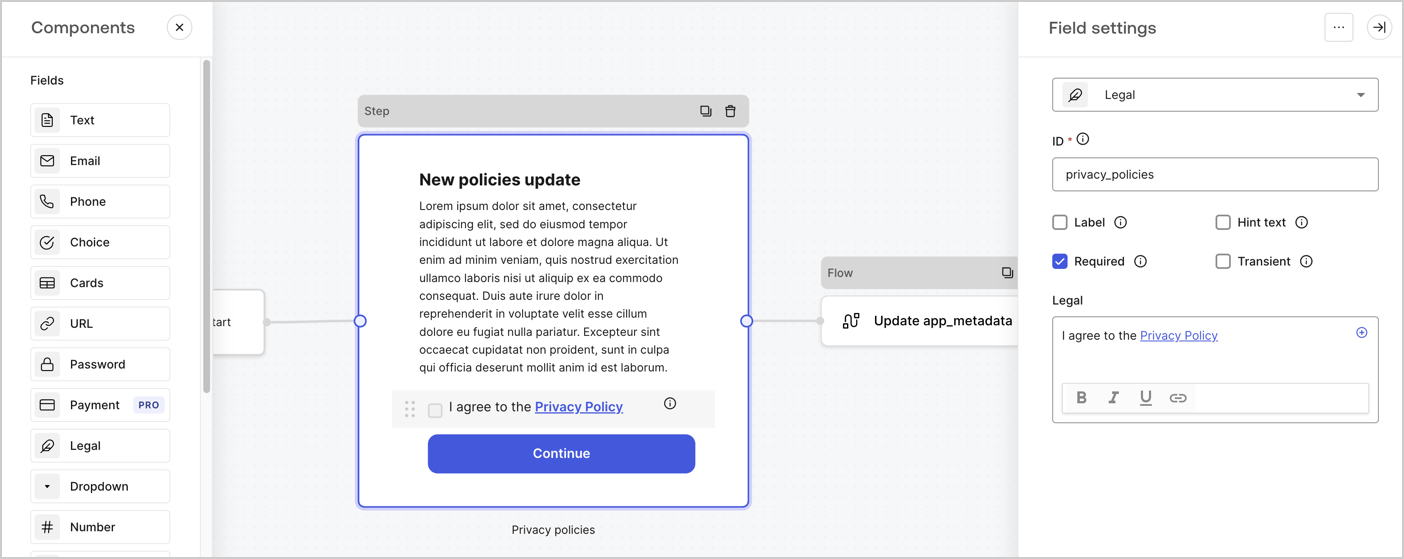
The Step node is the graphical interface visible to users. Add [Fields](/docs/customize/forms/nodes-and-components) to the Step node to collect the new agreement acceptance value by following these steps:

1. Drag a **Rich text** field from the **Components menu** into the **Step** node.

   * **Rich text**: Enter a description of your privacy policies updates.
   * Select **Save**.
2. Drag a **Legal** field into the **Step** node.

   * **ID**: Enter `privacy_policies`.
   * **Required**: Enable the checkbox.
   * **Legal**: Enter `I agree to the Privacy Policy`.
   * Select **Save**.
3. Select **Publish** to save.
<Frame>
  <img src="https://mintcdn.com/docs-staging-feat-universal-portals/0P7iaX2K4I6olJ5u/docs/images/cdy7uua7fh8z/59zFFjQjAnjogkc2QGIqqJ/0ad66b1b636544122aa4e65968b76c2c/privacy-policy-step-node.png?fit=max&auto=format&n=0P7iaX2K4I6olJ5u&q=85&s=3e005321467fdc617e73ee1fd00e8fa0" alt="Dashboard > Actions > Forms > Use case privacy policy step node" data-og-width="1404" width="1404" data-og-height="559" height="559" data-path="docs/images/cdy7uua7fh8z/59zFFjQjAnjogkc2QGIqqJ/0ad66b1b636544122aa4e65968b76c2c/privacy-policy-step-node.png" data-optimize="true" data-opv="3" srcset="https://mintcdn.com/docs-staging-feat-universal-portals/0P7iaX2K4I6olJ5u/docs/images/cdy7uua7fh8z/59zFFjQjAnjogkc2QGIqqJ/0ad66b1b636544122aa4e65968b76c2c/privacy-policy-step-node.png?w=280&fit=max&auto=format&n=0P7iaX2K4I6olJ5u&q=85&s=f6738fc08c2143327faebee2cd058688 280w, https://mintcdn.com/docs-staging-feat-universal-portals/0P7iaX2K4I6olJ5u/docs/images/cdy7uua7fh8z/59zFFjQjAnjogkc2QGIqqJ/0ad66b1b636544122aa4e65968b76c2c/privacy-policy-step-node.png?w=560&fit=max&auto=format&n=0P7iaX2K4I6olJ5u&q=85&s=6ff5258f625133bdc4ffd2f6cb7c8f09 560w, https://mintcdn.com/docs-staging-feat-universal-portals/0P7iaX2K4I6olJ5u/docs/images/cdy7uua7fh8z/59zFFjQjAnjogkc2QGIqqJ/0ad66b1b636544122aa4e65968b76c2c/privacy-policy-step-node.png?w=840&fit=max&auto=format&n=0P7iaX2K4I6olJ5u&q=85&s=30b7b41062a50517d4342fe0c52e18c8 840w, https://mintcdn.com/docs-staging-feat-universal-portals/0P7iaX2K4I6olJ5u/docs/images/cdy7uua7fh8z/59zFFjQjAnjogkc2QGIqqJ/0ad66b1b636544122aa4e65968b76c2c/privacy-policy-step-node.png?w=1100&fit=max&auto=format&n=0P7iaX2K4I6olJ5u&q=85&s=56bc68d1c89524e9b650795a49a4bd0f 1100w, https://mintcdn.com/docs-staging-feat-universal-portals/0P7iaX2K4I6olJ5u/docs/images/cdy7uua7fh8z/59zFFjQjAnjogkc2QGIqqJ/0ad66b1b636544122aa4e65968b76c2c/privacy-policy-step-node.png?w=1650&fit=max&auto=format&n=0P7iaX2K4I6olJ5u&q=85&s=4e85eef2c1415344a27357e416e1eb32 1650w, https://mintcdn.com/docs-staging-feat-universal-portals/0P7iaX2K4I6olJ5u/docs/images/cdy7uua7fh8z/59zFFjQjAnjogkc2QGIqqJ/0ad66b1b636544122aa4e65968b76c2c/privacy-policy-step-node.png?w=2500&fit=max&auto=format&n=0P7iaX2K4I6olJ5u&q=85&s=68abc13a7b82bb2d511d51bdb7b30bcd 2500w" />
</Frame>

### Configure the Flow node

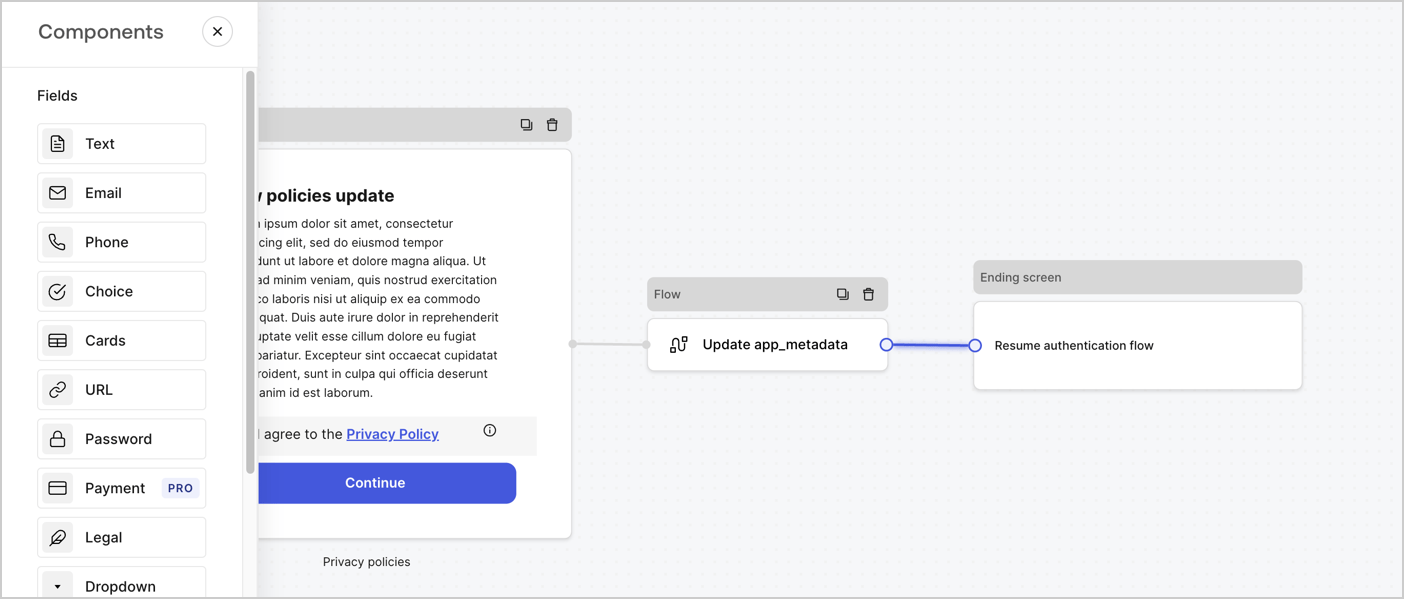
Add a **Flow** node after the **Step** node to update the `app_metadata` and resume the authentication flow by following these steps:

1. Select **Flow** from the bottom of the Form editor.
2. Remove the existing link between the **Step** and **Ending Screen** nodes.
3. Select the new **Flow** > **Click to add a flow** > **Create a new flow.**

   * Enter `Update app_metadata` in the **Name** field.
   * Select **Create**.
   * Select **Save**.
4. Link the **Flow** node to the **Step** and **Ending Screen** nodes as pictured below.
5. Select **Publish** to save.
<Frame>
  <img src="https://mintcdn.com/docs-staging-feat-universal-portals/CK2KNQ8eWcFZT4zq/docs/images/cdy7uua7fh8z/6YIkzm7SrpM9LW76AXuRzh/353c518fe82bbaa440836da1d83596d6/link-policies.png?fit=max&auto=format&n=CK2KNQ8eWcFZT4zq&q=85&s=8914160c9f56751136c405b66ddb356c" alt="Dashboard > Actions > Forms > Form" data-og-width="1404" width="1404" data-og-height="599" height="599" data-path="docs/images/cdy7uua7fh8z/6YIkzm7SrpM9LW76AXuRzh/353c518fe82bbaa440836da1d83596d6/link-policies.png" data-optimize="true" data-opv="3" srcset="https://mintcdn.com/docs-staging-feat-universal-portals/CK2KNQ8eWcFZT4zq/docs/images/cdy7uua7fh8z/6YIkzm7SrpM9LW76AXuRzh/353c518fe82bbaa440836da1d83596d6/link-policies.png?w=280&fit=max&auto=format&n=CK2KNQ8eWcFZT4zq&q=85&s=376d5cc8be8019685243c780e3876160 280w, https://mintcdn.com/docs-staging-feat-universal-portals/CK2KNQ8eWcFZT4zq/docs/images/cdy7uua7fh8z/6YIkzm7SrpM9LW76AXuRzh/353c518fe82bbaa440836da1d83596d6/link-policies.png?w=560&fit=max&auto=format&n=CK2KNQ8eWcFZT4zq&q=85&s=223225491ae163873fd691772537e226 560w, https://mintcdn.com/docs-staging-feat-universal-portals/CK2KNQ8eWcFZT4zq/docs/images/cdy7uua7fh8z/6YIkzm7SrpM9LW76AXuRzh/353c518fe82bbaa440836da1d83596d6/link-policies.png?w=840&fit=max&auto=format&n=CK2KNQ8eWcFZT4zq&q=85&s=9cbdf89562e0d602da6e370a0041e4b6 840w, https://mintcdn.com/docs-staging-feat-universal-portals/CK2KNQ8eWcFZT4zq/docs/images/cdy7uua7fh8z/6YIkzm7SrpM9LW76AXuRzh/353c518fe82bbaa440836da1d83596d6/link-policies.png?w=1100&fit=max&auto=format&n=CK2KNQ8eWcFZT4zq&q=85&s=37e88c124a9835576f8bba3380924f97 1100w, https://mintcdn.com/docs-staging-feat-universal-portals/CK2KNQ8eWcFZT4zq/docs/images/cdy7uua7fh8z/6YIkzm7SrpM9LW76AXuRzh/353c518fe82bbaa440836da1d83596d6/link-policies.png?w=1650&fit=max&auto=format&n=CK2KNQ8eWcFZT4zq&q=85&s=58d719e43a77975352a95581d0edce5e 1650w, https://mintcdn.com/docs-staging-feat-universal-portals/CK2KNQ8eWcFZT4zq/docs/images/cdy7uua7fh8z/6YIkzm7SrpM9LW76AXuRzh/353c518fe82bbaa440836da1d83596d6/link-policies.png?w=2500&fit=max&auto=format&n=CK2KNQ8eWcFZT4zq&q=85&s=aa388ea161b094e20c287e7e689fe587 2500w" />
</Frame>

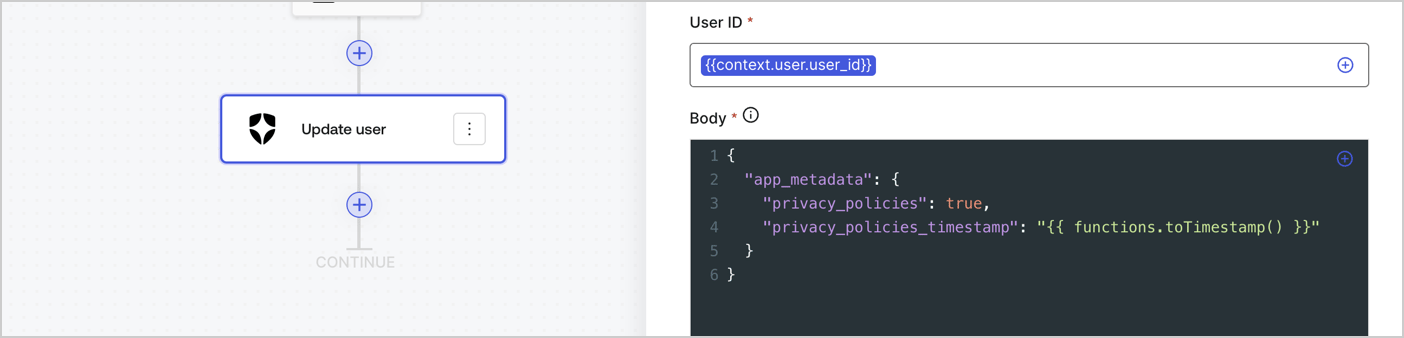
Add an Auth0 Update user action to the flow by following these steps:

1. Select the **Flow** **Update app\_metadata** > **Edit flow** to open the Flow editor in a new tab.
2. Below the StartAction, select the **+** icon to add an **Update user** action. Complete the fields below, then select **Save** to continue.

   * **Connection**: Select from the dropdown the Vault connection to your M2M application.

   * **User ID**: Enter `{{context.user.user_id}}`.

   * **Body**: Copy and paste the following code to update the app\_metadata with the privacy\_policies and privacy\_policies\_timestamp properties.

     ```text lines theme={null}
     {
       "app_metadata": {
         "privacy_policies": true,
         "privacy_policies_timestamp": "{{ functions.toTimestamp() }}"
       }
     }
     ```

   * Select **Save**.
3. Select **Publish** to save.
<Frame>
  <img src="https://mintcdn.com/docs-staging-feat-universal-portals/pDq1ixGbr7_Q4Z5q/docs/images/cdy7uua7fh8z/CvMNIwWrOUwaFW4X3G28p/1fb70ae57a20749d9ffaaba8dc0b7e26/update-user-privacy.png?fit=max&auto=format&n=pDq1ixGbr7_Q4Z5q&q=85&s=40dcd4f4fdfdce712f34d2d148b4ed18" alt="Dashboard > Actions > Forms > User case privacy policy code" data-og-width="1404" width="1404" data-og-height="338" height="338" data-path="docs/images/cdy7uua7fh8z/CvMNIwWrOUwaFW4X3G28p/1fb70ae57a20749d9ffaaba8dc0b7e26/update-user-privacy.png" data-optimize="true" data-opv="3" srcset="https://mintcdn.com/docs-staging-feat-universal-portals/pDq1ixGbr7_Q4Z5q/docs/images/cdy7uua7fh8z/CvMNIwWrOUwaFW4X3G28p/1fb70ae57a20749d9ffaaba8dc0b7e26/update-user-privacy.png?w=280&fit=max&auto=format&n=pDq1ixGbr7_Q4Z5q&q=85&s=e9d9515bf3afc9501b1db53bde44c0c4 280w, https://mintcdn.com/docs-staging-feat-universal-portals/pDq1ixGbr7_Q4Z5q/docs/images/cdy7uua7fh8z/CvMNIwWrOUwaFW4X3G28p/1fb70ae57a20749d9ffaaba8dc0b7e26/update-user-privacy.png?w=560&fit=max&auto=format&n=pDq1ixGbr7_Q4Z5q&q=85&s=f0c7d7666b1b37b93fadeea34995b8cb 560w, https://mintcdn.com/docs-staging-feat-universal-portals/pDq1ixGbr7_Q4Z5q/docs/images/cdy7uua7fh8z/CvMNIwWrOUwaFW4X3G28p/1fb70ae57a20749d9ffaaba8dc0b7e26/update-user-privacy.png?w=840&fit=max&auto=format&n=pDq1ixGbr7_Q4Z5q&q=85&s=d6e7d37386242448d8b744b254f36c50 840w, https://mintcdn.com/docs-staging-feat-universal-portals/pDq1ixGbr7_Q4Z5q/docs/images/cdy7uua7fh8z/CvMNIwWrOUwaFW4X3G28p/1fb70ae57a20749d9ffaaba8dc0b7e26/update-user-privacy.png?w=1100&fit=max&auto=format&n=pDq1ixGbr7_Q4Z5q&q=85&s=a6c3f5371cab47f0dc117f4a1426fb68 1100w, https://mintcdn.com/docs-staging-feat-universal-portals/pDq1ixGbr7_Q4Z5q/docs/images/cdy7uua7fh8z/CvMNIwWrOUwaFW4X3G28p/1fb70ae57a20749d9ffaaba8dc0b7e26/update-user-privacy.png?w=1650&fit=max&auto=format&n=pDq1ixGbr7_Q4Z5q&q=85&s=abfc3a1f60da0c289125cabd4e3424e6 1650w, https://mintcdn.com/docs-staging-feat-universal-portals/pDq1ixGbr7_Q4Z5q/docs/images/cdy7uua7fh8z/CvMNIwWrOUwaFW4X3G28p/1fb70ae57a20749d9ffaaba8dc0b7e26/update-user-privacy.png?w=2500&fit=max&auto=format&n=pDq1ixGbr7_Q4Z5q&q=85&s=de1c46b3741e091f0d841eabc5ceeb59 2500w" />
</Frame>

<Callout icon="file-lines" color="#0EA5E9" iconType="regular">
  The flow **Update app\_metadata** adds a `privacy_policies true` value to the app`_metadata` object and also generates a timestamp with a [helper function.](/docs/customize/forms/variables)
</Callout>

## Retrieve the form render code

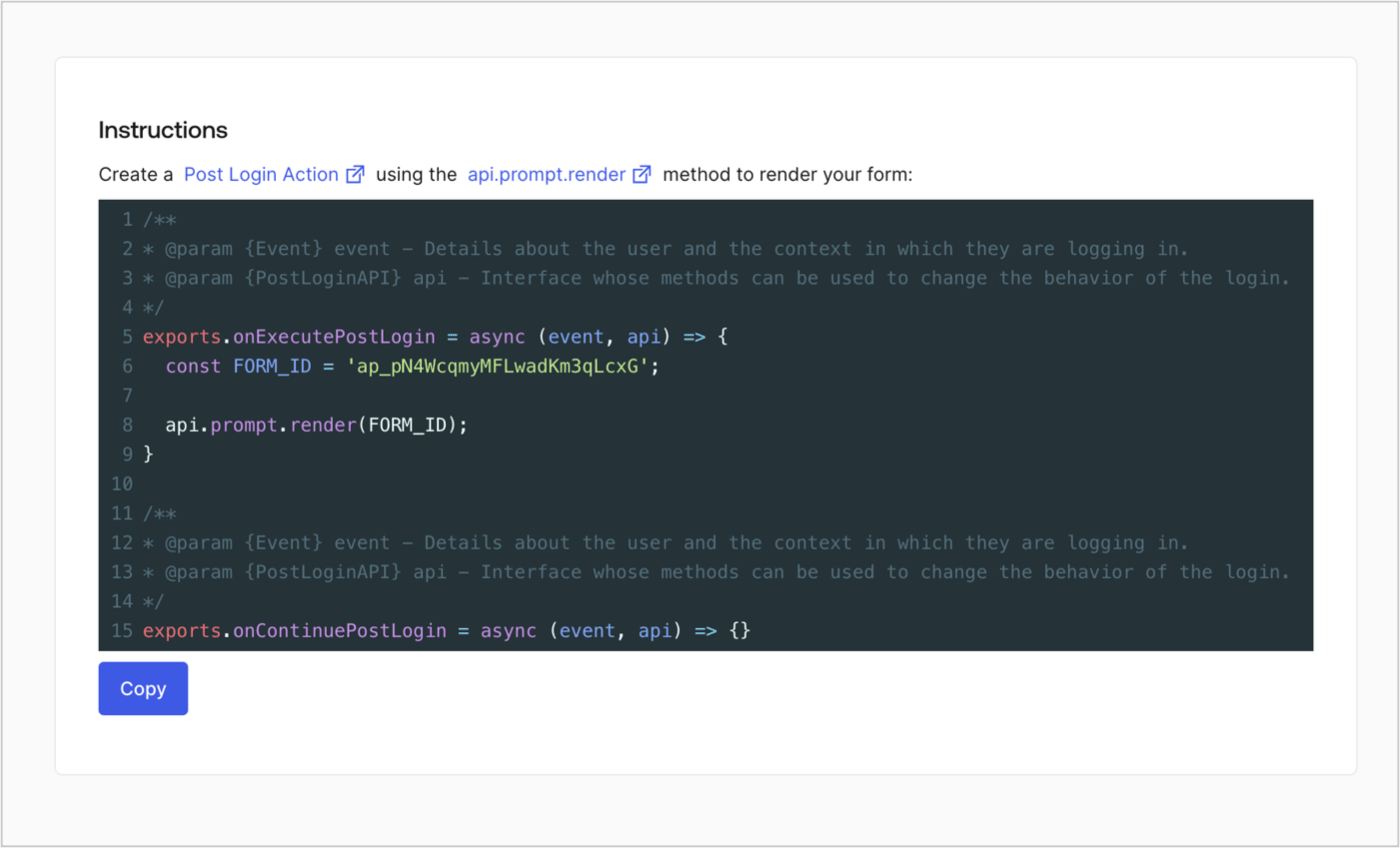
Retrieve your form render code to visually render the form with a custom Post Login Action by following these steps:

* From the Form editor, select **`<> Render`**.
* Select **Copy**.
<Frame>
  <img src="https://mintcdn.com/docs-staging-feat-universal-portals/9FNB6mLD6Drkqlz9/docs/images/cdy7uua7fh8z/2EIUzc539sq9lwoTKbjoJv/496a864c0fc44a782c9cadca119dbfb0/embed.png?fit=max&auto=format&n=9FNB6mLD6Drkqlz9&q=85&s=8f679f1924267910a0778256ddd9d4f9" alt="Dashboard > Actions > Forms > Form > Embed" data-og-width="1400" width="1400" data-og-height="848" height="848" data-path="docs/images/cdy7uua7fh8z/2EIUzc539sq9lwoTKbjoJv/496a864c0fc44a782c9cadca119dbfb0/embed.png" data-optimize="true" data-opv="3" srcset="https://mintcdn.com/docs-staging-feat-universal-portals/9FNB6mLD6Drkqlz9/docs/images/cdy7uua7fh8z/2EIUzc539sq9lwoTKbjoJv/496a864c0fc44a782c9cadca119dbfb0/embed.png?w=280&fit=max&auto=format&n=9FNB6mLD6Drkqlz9&q=85&s=a08f7b7b15693b344ae749d1fda00097 280w, https://mintcdn.com/docs-staging-feat-universal-portals/9FNB6mLD6Drkqlz9/docs/images/cdy7uua7fh8z/2EIUzc539sq9lwoTKbjoJv/496a864c0fc44a782c9cadca119dbfb0/embed.png?w=560&fit=max&auto=format&n=9FNB6mLD6Drkqlz9&q=85&s=0043b0c754741ea0974324acc6473da2 560w, https://mintcdn.com/docs-staging-feat-universal-portals/9FNB6mLD6Drkqlz9/docs/images/cdy7uua7fh8z/2EIUzc539sq9lwoTKbjoJv/496a864c0fc44a782c9cadca119dbfb0/embed.png?w=840&fit=max&auto=format&n=9FNB6mLD6Drkqlz9&q=85&s=6a2c0350c108a1b5e58d63134cda7062 840w, https://mintcdn.com/docs-staging-feat-universal-portals/9FNB6mLD6Drkqlz9/docs/images/cdy7uua7fh8z/2EIUzc539sq9lwoTKbjoJv/496a864c0fc44a782c9cadca119dbfb0/embed.png?w=1100&fit=max&auto=format&n=9FNB6mLD6Drkqlz9&q=85&s=d733e24e0dbcd687d09164ad453f6099 1100w, https://mintcdn.com/docs-staging-feat-universal-portals/9FNB6mLD6Drkqlz9/docs/images/cdy7uua7fh8z/2EIUzc539sq9lwoTKbjoJv/496a864c0fc44a782c9cadca119dbfb0/embed.png?w=1650&fit=max&auto=format&n=9FNB6mLD6Drkqlz9&q=85&s=44f4f392eee7032bd4931aedc0384247 1650w, https://mintcdn.com/docs-staging-feat-universal-portals/9FNB6mLD6Drkqlz9/docs/images/cdy7uua7fh8z/2EIUzc539sq9lwoTKbjoJv/496a864c0fc44a782c9cadca119dbfb0/embed.png?w=2500&fit=max&auto=format&n=9FNB6mLD6Drkqlz9&q=85&s=b961cc5615e2623aa5dee8b9743a4037 2500w" />
</Frame>

## Create a Post Login Action

Create a post-login Action to render your form by following these steps:

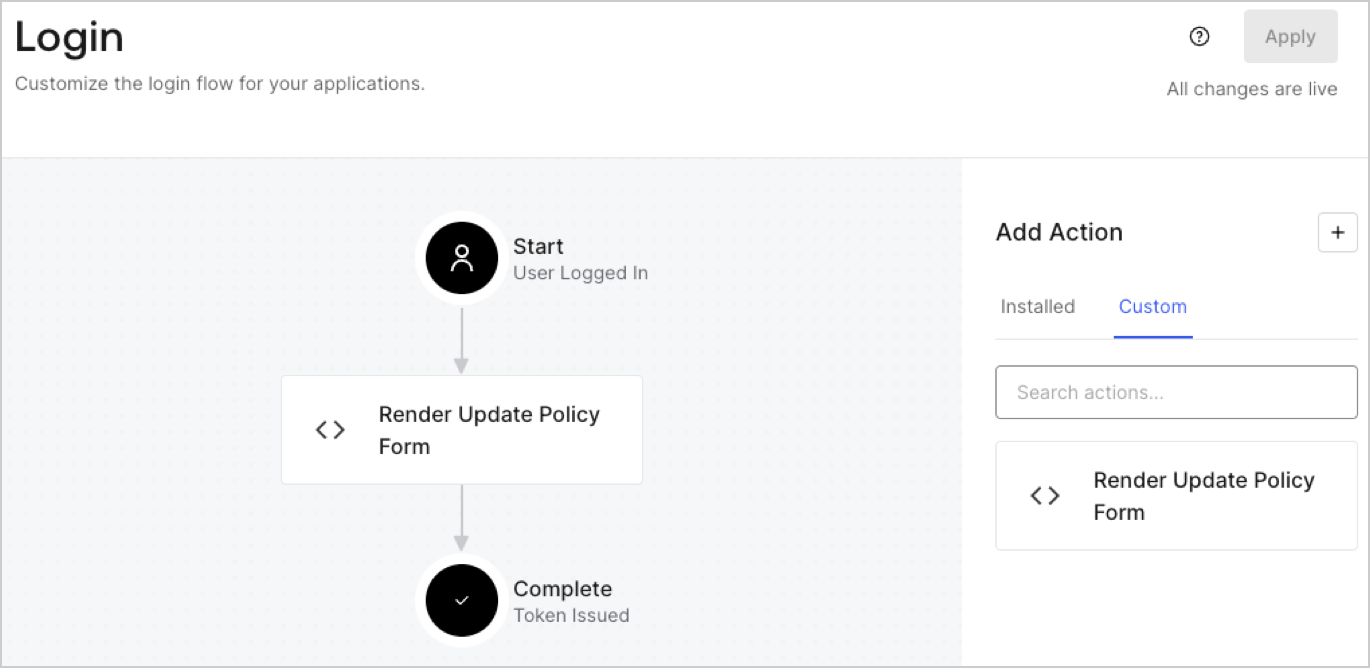
1. Navigate to **Auth0 Dashboard > Actions > Flows > Login.**
2. Select the **+** icon and Select **Build from scratch**:

   * **Name**: Enter `Render Update Policy Form`.
   * **Trigger**: Select `Login / Post Login`.
   * **Runtime**: Select the recommended version.
3. Select **Create**.

To configure the post-login Action:

1. Delete the existing code from the Code editor.
2. Paste the form render code into the Code editor.
3. Edit the code to define the conditional logic that will render the form.

   ```javascript lines theme={null}
   /**
   * @param {Event} event - Details about the user and the context in which they are logging in.
   * @param {PostLoginAPI} api - Interface whose methods can be used to change the behavior of the login.
   */
   exports.onExecutePostLogin = async (event, api) => {
     const FORM_ID = 'REPLACE_WITH_YOUR_FORM_ID';

     if (event.user.app_metadata.privacy_policies !== true) {
       api.prompt.render(FORM_ID);
     }
   }

   exports.onContinuePostLogin = async (event, api) => { }
   ```

   <Callout icon="file-lines" color="#0EA5E9" iconType="regular">
     The example code above will render the form when a user is missing the app metadata `privacy_policies` property.
   </Callout>
4. Select **Deploy.**
5. Drag and Drop the **Render Update Policy Form** Action to the **Login** flow.
   <Frame>
     <img src="https://mintcdn.com/docs-staging-feat-universal-portals/D7gOZOxGBZ5jn4L-/docs/images/cdy7uua7fh8z/5TOwDgevZsBqd7yZynUYWU/41ca909dc3007aed4f40ff794a05efa5/postlogin.png?fit=max&auto=format&n=D7gOZOxGBZ5jn4L-&q=85&s=08cb529afa6027c32ee2218a9e726517" alt="Dashboard > Forms > Use Case > Render update policy form login action" data-og-width="1370" width="1370" data-og-height="668" height="668" data-path="docs/images/cdy7uua7fh8z/5TOwDgevZsBqd7yZynUYWU/41ca909dc3007aed4f40ff794a05efa5/postlogin.png" data-optimize="true" data-opv="3" srcset="https://mintcdn.com/docs-staging-feat-universal-portals/D7gOZOxGBZ5jn4L-/docs/images/cdy7uua7fh8z/5TOwDgevZsBqd7yZynUYWU/41ca909dc3007aed4f40ff794a05efa5/postlogin.png?w=280&fit=max&auto=format&n=D7gOZOxGBZ5jn4L-&q=85&s=e79939f1e1dd54eb53f01b1b5a6596df 280w, https://mintcdn.com/docs-staging-feat-universal-portals/D7gOZOxGBZ5jn4L-/docs/images/cdy7uua7fh8z/5TOwDgevZsBqd7yZynUYWU/41ca909dc3007aed4f40ff794a05efa5/postlogin.png?w=560&fit=max&auto=format&n=D7gOZOxGBZ5jn4L-&q=85&s=fade56092bb9dc2698e2592310bf1f9c 560w, https://mintcdn.com/docs-staging-feat-universal-portals/D7gOZOxGBZ5jn4L-/docs/images/cdy7uua7fh8z/5TOwDgevZsBqd7yZynUYWU/41ca909dc3007aed4f40ff794a05efa5/postlogin.png?w=840&fit=max&auto=format&n=D7gOZOxGBZ5jn4L-&q=85&s=b1819be6a654388a6f2496095fc56be3 840w, https://mintcdn.com/docs-staging-feat-universal-portals/D7gOZOxGBZ5jn4L-/docs/images/cdy7uua7fh8z/5TOwDgevZsBqd7yZynUYWU/41ca909dc3007aed4f40ff794a05efa5/postlogin.png?w=1100&fit=max&auto=format&n=D7gOZOxGBZ5jn4L-&q=85&s=420b53ab9a55c77f9a7904e50a027c43 1100w, https://mintcdn.com/docs-staging-feat-universal-portals/D7gOZOxGBZ5jn4L-/docs/images/cdy7uua7fh8z/5TOwDgevZsBqd7yZynUYWU/41ca909dc3007aed4f40ff794a05efa5/postlogin.png?w=1650&fit=max&auto=format&n=D7gOZOxGBZ5jn4L-&q=85&s=55688f16dc39a613268516201e3e3c18 1650w, https://mintcdn.com/docs-staging-feat-universal-portals/D7gOZOxGBZ5jn4L-/docs/images/cdy7uua7fh8z/5TOwDgevZsBqd7yZynUYWU/41ca909dc3007aed4f40ff794a05efa5/postlogin.png?w=2500&fit=max&auto=format&n=D7gOZOxGBZ5jn4L-&q=85&s=eecba85e80397e64305826d88abbd564 2500w" />
   </Frame>
6. Select **Apply.**

### Test implementation

Test the implementation by following these steps:

1. Log in with an existing user whose app`_metadata` attribute `privacy_policies` does not have a value.
2. The post-login Action in the Login flow will render the form and prompt for acceptance.
3. Select **Auth0 Dashboard > User Management > Users,** locate the user and verify that the `app_metadata` attribute `privacy_policies` contains a `true` value and a timestamp.
